'%3e%3cpath%20class='a'%20d='M662.846,1043.8l-14.75-10.817-14.912,10.936a15.981,15.981,0,1,1,29.662-.119Z'%20transform='translate(-632.011%20-1022.02)'/%3e%3cpath%20class='b'%20d='M704.176,1354.583l13.291,9.865a16.179,16.179,0,0,1-26.706.112Z'%20transform='translate(-688.094%20-1339.553)'/%3e%3c/g%3e%3cg%20transform='translate(40.433)'%3e%3cpath%20class='a'%20d='M21.61-179.726a26.985,26.985,0,0,0-8.211-1.5c-7.4,0-11.8,4.757-11.8,12.382,0,4.106,2.509,6.256,5.539,6.256a8,8,0,0,0,5.507-2.281l.424,2.053h5.213Zm-7.234,3.519-1.6,7.722a4.593,4.593,0,0,1-2.411.782c-1.173,0-2.02-.749-2.02-2.444,0-3.389,1.6-6.191,4.79-6.191A8.418,8.418,0,0,1,14.377-176.207ZM38-168.583a14.118,14.118,0,0,1-5.7,1.238c-2.216,0-3.519-.88-3.519-2.444a4.5,4.5,0,0,1,.1-.815,15,15,0,0,0,3.975.554c3.812,0,7.266-1.629,7.266-6.028,0-2.7-2.151-5.148-6.745-5.148-7.331,0-11.469,5.735-11.469,11.8,0,5.507,3.877,7.038,8.635,7.038a25.253,25.253,0,0,0,6.908-1.043ZM29.267-173.7a3.587,3.587,0,0,1,3.324-3.226c1.173,0,1.6.587,1.6,1.238,0,1.271-.945,2.085-3.291,2.085C30.473-173.6,29.886-173.633,29.267-173.7Zm31.248-6.028a27.108,27.108,0,0,0-8.113-1.5c-7.592,0-11.991,4.953-11.991,12.414,0,4.334,2.607,6.223,5.572,6.223a8.258,8.258,0,0,0,5.6-2.281l-.1.815c-.326,2.737-2.542,3.486-4.985,3.486a22.6,22.6,0,0,1-6-1.01l-.978,4.985a31.974,31.974,0,0,0,6.843.847c5.441,0,9.775-1.792,10.948-7.69Zm-7.234,3.552-1.531,7.69a5.239,5.239,0,0,1-2.574.782c-1.173,0-2.02-.782-2.02-2.379,0-3.454,1.4-6.223,4.725-6.223A7.013,7.013,0,0,1,53.281-176.175Zm10.362-4.659-2.476,12.349c-.717,3.617.652,5.865,4.464,5.865a25.851,25.851,0,0,0,3.747-.293l.782-4.334c-2.281.033-2.542-.912-2.216-2.574l2.281-11.013Zm7.82,13.1-1.075,4.822a39.953,39.953,0,0,0,6.289.489c5.7,0,9.775-2.313,9.775-7.331,0-5.474-7.4-3.877-7.4-5.637,0-.652.619-1.14,2.607-1.14a23.311,23.311,0,0,1,4.79.554l1.108-4.659a29.486,29.486,0,0,0-5.735-.586c-4.985,0-9.58,2.118-9.58,7.136,0,5.311,7.4,3.78,7.4,5.409,0,1.108-1.173,1.5-2.867,1.5A29.214,29.214,0,0,1,71.463-167.735Z'%20transform='translate(-1.604%20187.383)'/%3e%3cpath%20class='b'%20d='M614.561-237.057h6.712l.945-4.79h-6.712Z'%20transform='translate(-552.294%20241.847)'/%3e%3c/g%3e%3c/svg%3e)
To protect a video with Content ID, Aegis needs its own copy of the file. We usually make that copy from YouTube when you submit the video, and most of the time you never think about it. Sometimes YouTube doesn't let us download a video. Until now, that video could sit in review without anyone telling you why.
Since October 20, Aegis tells you, and you can fix it in a minute.
Needs your file
When we can't copy a video, it gets a Needs your file label in Video Management, with a Provide file button next to it. A banner at the top of the page says how many of your videos are waiting, with a Review videos button. Music works the same way, in Music Management.
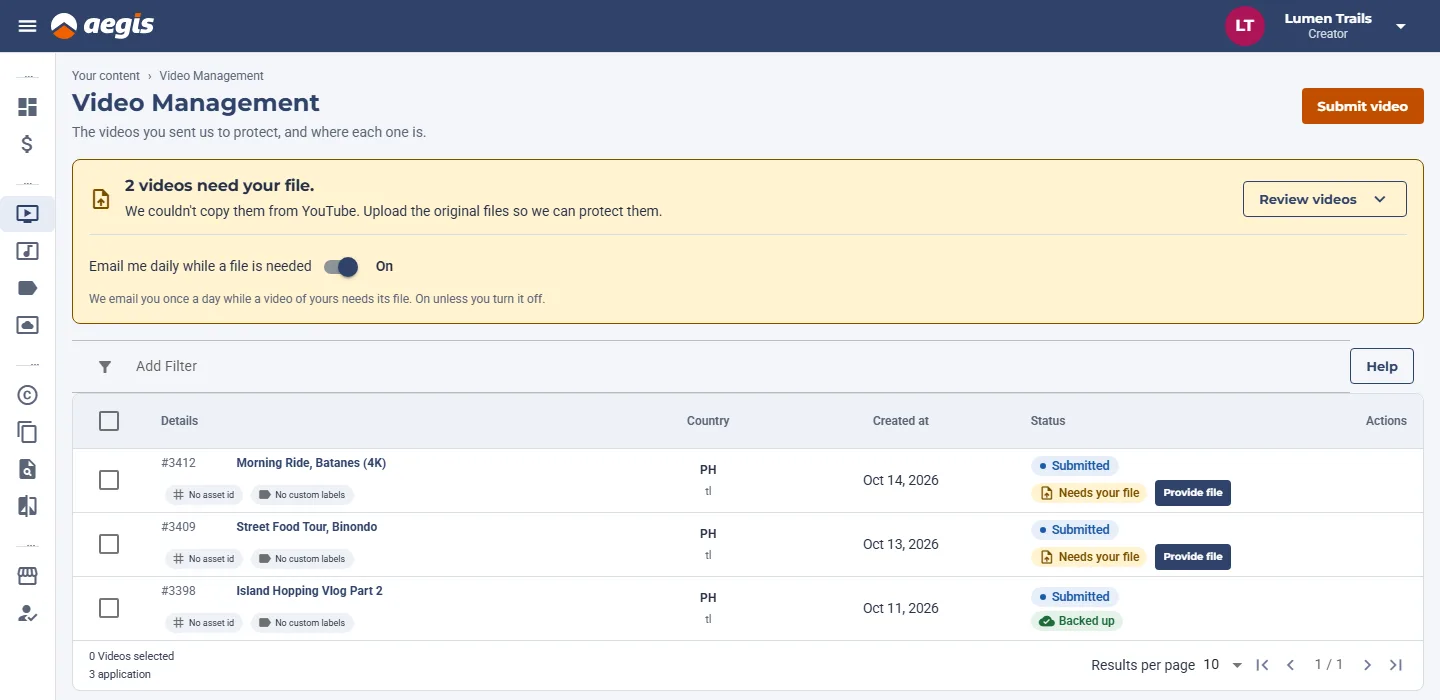
Provide file opens a dialog with two ways to send it:
- Upload file. Drop the original file, or choose it from your computer. You can pause and resume, and you can close the dialog: the upload continues while Aegis is open, and picks up again if your connection drops. The dialog shows which file types it accepts and the largest size it takes.
- Google Drive link. For a bigger file, or one that's already in Drive, paste its link. Set sharing to "Anyone with the link can view" first. We check the link before we save it.
Send the original export if you have it. Once the file arrives, the label changes to File received, then to Backed up when your copy is saved.
Why it matters
We can't register a video with Content ID without the file, so a new video can't be approved until we have it. Sending the file is what moves it forward. Videos submitted before October 20 aren't affected.
A daily email while a file is needed
Once a day, while any of your videos needs its file, we email you the list with a link to Video Management. When nothing is waiting, there's no email.
It's on unless you turn it off. The banner has a switch, Email me daily while a file is needed, and every email has an unsubscribe link. Stopping the email changes nothing else: videos that need a file still show in Aegis.
For agencies
If an agency manages your channel, it can send the file for you. Agency owners get a Files needed page under Your agency in the side menu. It lists their creators' videos that need a file, with a filter by creator, and the same Provide file dialog. Whoever sends the file first, you or your agency, resolves the request.
Agencies get their own daily email about their creators' files, with its own switch on the Files needed page and its own unsubscribe link. It doesn't change the emails creators get.
In short
If you see Needs your file, send the original file or a Drive link from that row. Open Video Management to check whether anything is waiting.