'%3e%3cpath%20class='a'%20d='M662.846,1043.8l-14.75-10.817-14.912,10.936a15.981,15.981,0,1,1,29.662-.119Z'%20transform='translate(-632.011%20-1022.02)'/%3e%3cpath%20class='b'%20d='M704.176,1354.583l13.291,9.865a16.179,16.179,0,0,1-26.706.112Z'%20transform='translate(-688.094%20-1339.553)'/%3e%3c/g%3e%3cg%20transform='translate(40.433)'%3e%3cpath%20class='a'%20d='M21.61-179.726a26.985,26.985,0,0,0-8.211-1.5c-7.4,0-11.8,4.757-11.8,12.382,0,4.106,2.509,6.256,5.539,6.256a8,8,0,0,0,5.507-2.281l.424,2.053h5.213Zm-7.234,3.519-1.6,7.722a4.593,4.593,0,0,1-2.411.782c-1.173,0-2.02-.749-2.02-2.444,0-3.389,1.6-6.191,4.79-6.191A8.418,8.418,0,0,1,14.377-176.207ZM38-168.583a14.118,14.118,0,0,1-5.7,1.238c-2.216,0-3.519-.88-3.519-2.444a4.5,4.5,0,0,1,.1-.815,15,15,0,0,0,3.975.554c3.812,0,7.266-1.629,7.266-6.028,0-2.7-2.151-5.148-6.745-5.148-7.331,0-11.469,5.735-11.469,11.8,0,5.507,3.877,7.038,8.635,7.038a25.253,25.253,0,0,0,6.908-1.043ZM29.267-173.7a3.587,3.587,0,0,1,3.324-3.226c1.173,0,1.6.587,1.6,1.238,0,1.271-.945,2.085-3.291,2.085C30.473-173.6,29.886-173.633,29.267-173.7Zm31.248-6.028a27.108,27.108,0,0,0-8.113-1.5c-7.592,0-11.991,4.953-11.991,12.414,0,4.334,2.607,6.223,5.572,6.223a8.258,8.258,0,0,0,5.6-2.281l-.1.815c-.326,2.737-2.542,3.486-4.985,3.486a22.6,22.6,0,0,1-6-1.01l-.978,4.985a31.974,31.974,0,0,0,6.843.847c5.441,0,9.775-1.792,10.948-7.69Zm-7.234,3.552-1.531,7.69a5.239,5.239,0,0,1-2.574.782c-1.173,0-2.02-.782-2.02-2.379,0-3.454,1.4-6.223,4.725-6.223A7.013,7.013,0,0,1,53.281-176.175Zm10.362-4.659-2.476,12.349c-.717,3.617.652,5.865,4.464,5.865a25.851,25.851,0,0,0,3.747-.293l.782-4.334c-2.281.033-2.542-.912-2.216-2.574l2.281-11.013Zm7.82,13.1-1.075,4.822a39.953,39.953,0,0,0,6.289.489c5.7,0,9.775-2.313,9.775-7.331,0-5.474-7.4-3.877-7.4-5.637,0-.652.619-1.14,2.607-1.14a23.311,23.311,0,0,1,4.79.554l1.108-4.659a29.486,29.486,0,0,0-5.735-.586c-4.985,0-9.58,2.118-9.58,7.136,0,5.311,7.4,3.78,7.4,5.409,0,1.108-1.173,1.5-2.867,1.5A29.214,29.214,0,0,1,71.463-167.735Z'%20transform='translate(-1.604%20187.383)'/%3e%3cpath%20class='b'%20d='M614.561-237.057h6.712l.945-4.79h-6.712Z'%20transform='translate(-552.294%20241.847)'/%3e%3c/g%3e%3c/svg%3e)
Aegis keeps track of a lot for you: views on your claimed reuploads, new claims, earnings, the channels copying your videos. Until now you had to sign in to see any of it.
From this month, Aegis sends you a short email on the 5th with what happened the month before. The first one went out on 5 November and covers October.
When it arrives
The email goes out on the 5th of each month, at 12:00 UTC, and covers the whole of the month before. It comes once a month and never twice for the same month.
It's in your language when the Aegis app has it (English, Arabic, Spanish, Hindi, Portuguese, Russian, Thai or Traditional Chinese), chosen from the country on your account. Otherwise it's in English.
What creators get
You get the email if you had claims last month. The subject line gives you the short version, for example "Your October 2026 on Aegis: 214.38K views, $1,312.40 estimated".
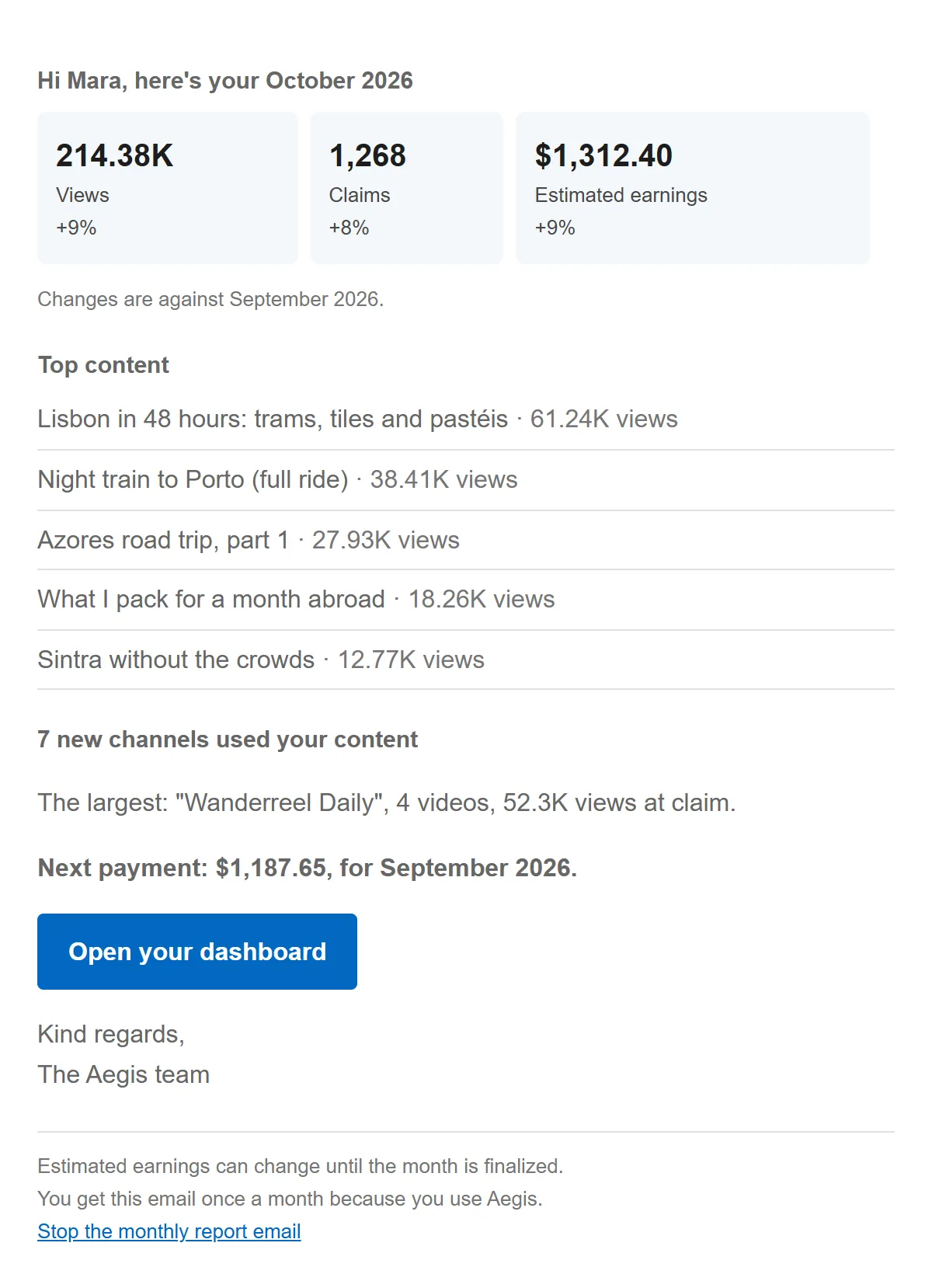
A sample email for a fictional creator. The names and figures are made up.
Three figures for the month. Views, claims and earnings, each with its change from the month before. "+9%" means up 9% on the month before, and "New" means there was nothing the month before to compare with.
Estimated earnings. On the 5th, YouTube usually hasn't finalized last month yet, so the earnings figure is an estimate and the email says so. It can still change until the month is finalized. The final figure shows on your Earnings page once YouTube has it.
Top content. Up to five of your videos or recordings with the most views in the month.
New channels using your content. How many channels used your content for the first time that month, and the largest of them, with its number of videos and the views those videos had when they were claimed. If no new channel turned up, this part is left out.
Your next payment. What Freedom! will pay you next and which months it covers, as the Earnings page shows it. It's left out when nothing is due, or when your agency pays you rather than Freedom!.
Open your dashboard. The button takes you to your Dashboard in Aegis.
If you joined Aegis through a partner, the email carries your partner's name and logo at the top, like your other Aegis emails.
What agencies get
Agency owners get a second email for the agency's whole roster: its creators and the agency's own account. It goes out at the same time, if any of your creators had figures last month. The subject names the agency, for example "Larkspur Collective · October 2026: 61.24M views across 38 creators". This email never carries a partner brand.
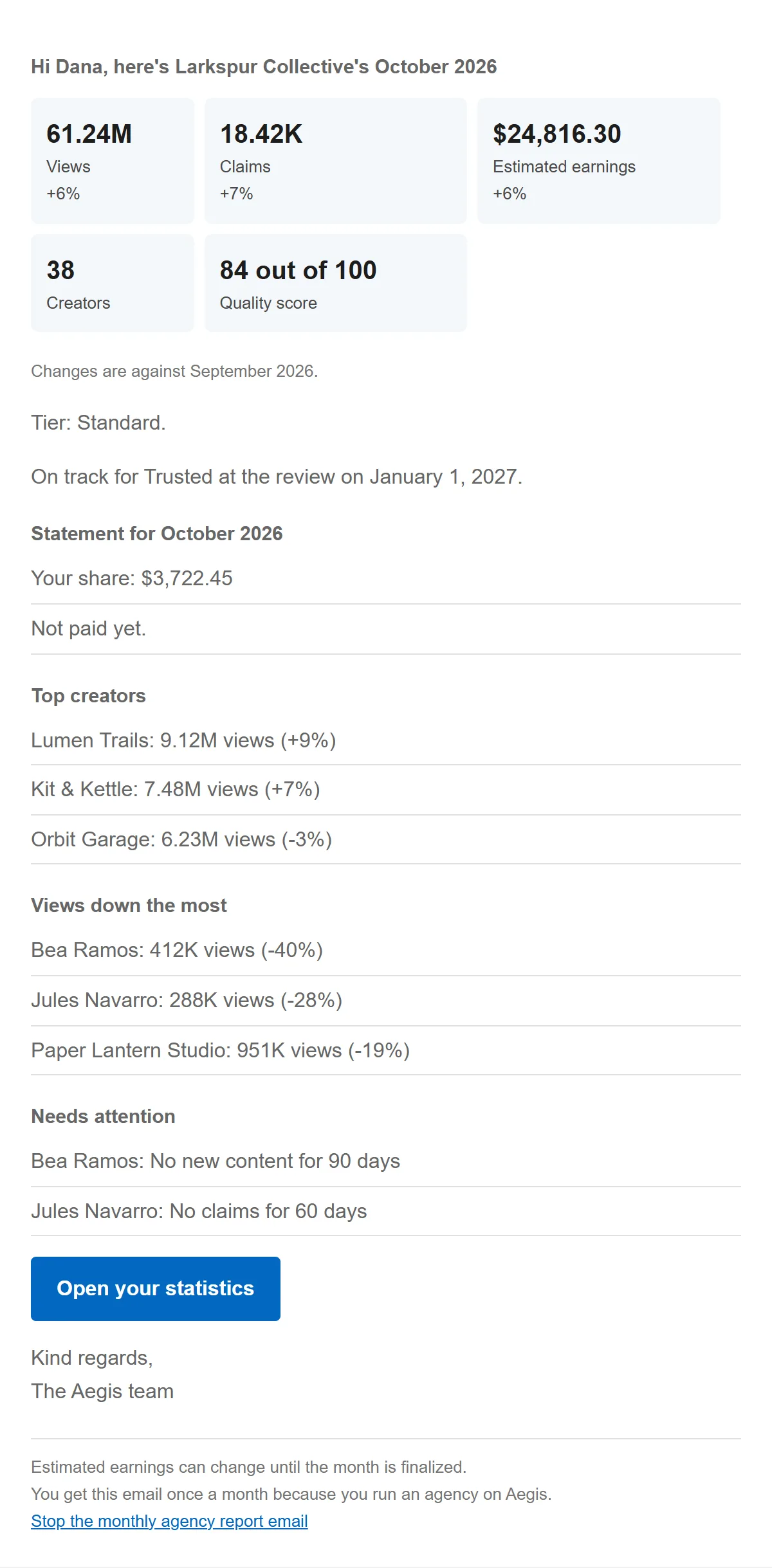
A sample email for a fictional agency. The names and figures are made up.
Your roster's figures. Views, claims and estimated earnings for all your creators together, with the change from the month before, the number of creators, and your claim quality score out of 100 when there is one. The figures come from the same monthly totals as your Statistics page, so the two add up.
Your tier. If your agency is on the partner program's tiers, the email gives your tier and whether you're on track for the next one at the next review, with its date.
Last month's statement. Your share of what your creators earned, and whether it has been paid yet, when the statement for the month is ready.
Top creators, and views down the most. Your three creators with the most views, and up to three others whose views fell the most compared with the month before, each with the change.
Needs attention. Creators flagged in Roster health, such as no claims for 60 days, no new content for 90 days, disputes rising or views down sharply. When nobody is flagged, this part is left out.
Open your statistics. The button opens Statistics in the partner console.
If your own account also had claims last month, you get both emails: the creator one for your own channel and the agency one for your roster.
Where to see more
The email is a summary. For the detail behind each figure, sign in to Aegis:
- Dashboard (aegis-app.h.ki/creator/dashboard): views, watch time, claims and earnings month by month, views day by day, and every approved content.
- Earnings (aegis-app.h.ki/creator/earnings): each month's status, your payments and statements to download.
- Reuploads (aegis-app.h.ki/creator/reuploads): every channel re-uploading your content, not just the largest.
- For agencies, Statistics, Statements and Creators in the partner console, covered in our post on tools for agencies.
Turning it off
The email is on for everyone unless you turn it off. There are two ways:
- From the email. The last link in each email, Stop the monthly report email, asks you to confirm and then turns it off. You don't need to sign in.
- In Aegis. At the bottom of your Dashboard, the Monthly report email card has a switch, Email me a monthly report. Turn it off, or back on, whenever you like.

The switch on the Dashboard.
Agencies have their own switch, Email me my agency's monthly report, on Statistics in the partner console. The agency owner and the agency's partner staff can change it. The two emails are separate: turning off the agency one leaves your creator email as it is, and your creators' own emails don't change either.
Turning the email off changes nothing else. Your figures stay in Aegis, and your other Aegis emails, such as the weekly re-uploader email, carry on as before.
More on your figures
To read your views day by day or see which countries they came from, see your views day by day and by country. To understand where your earnings come from, read detailed earnings by source and client.
Open your Dashboard to see last month in full.