'%3e%3cpath%20class='a'%20d='M662.846,1043.8l-14.75-10.817-14.912,10.936a15.981,15.981,0,1,1,29.662-.119Z'%20transform='translate(-632.011%20-1022.02)'/%3e%3cpath%20class='b'%20d='M704.176,1354.583l13.291,9.865a16.179,16.179,0,0,1-26.706.112Z'%20transform='translate(-688.094%20-1339.553)'/%3e%3c/g%3e%3cg%20transform='translate(40.433)'%3e%3cpath%20class='a'%20d='M21.61-179.726a26.985,26.985,0,0,0-8.211-1.5c-7.4,0-11.8,4.757-11.8,12.382,0,4.106,2.509,6.256,5.539,6.256a8,8,0,0,0,5.507-2.281l.424,2.053h5.213Zm-7.234,3.519-1.6,7.722a4.593,4.593,0,0,1-2.411.782c-1.173,0-2.02-.749-2.02-2.444,0-3.389,1.6-6.191,4.79-6.191A8.418,8.418,0,0,1,14.377-176.207ZM38-168.583a14.118,14.118,0,0,1-5.7,1.238c-2.216,0-3.519-.88-3.519-2.444a4.5,4.5,0,0,1,.1-.815,15,15,0,0,0,3.975.554c3.812,0,7.266-1.629,7.266-6.028,0-2.7-2.151-5.148-6.745-5.148-7.331,0-11.469,5.735-11.469,11.8,0,5.507,3.877,7.038,8.635,7.038a25.253,25.253,0,0,0,6.908-1.043ZM29.267-173.7a3.587,3.587,0,0,1,3.324-3.226c1.173,0,1.6.587,1.6,1.238,0,1.271-.945,2.085-3.291,2.085C30.473-173.6,29.886-173.633,29.267-173.7Zm31.248-6.028a27.108,27.108,0,0,0-8.113-1.5c-7.592,0-11.991,4.953-11.991,12.414,0,4.334,2.607,6.223,5.572,6.223a8.258,8.258,0,0,0,5.6-2.281l-.1.815c-.326,2.737-2.542,3.486-4.985,3.486a22.6,22.6,0,0,1-6-1.01l-.978,4.985a31.974,31.974,0,0,0,6.843.847c5.441,0,9.775-1.792,10.948-7.69Zm-7.234,3.552-1.531,7.69a5.239,5.239,0,0,1-2.574.782c-1.173,0-2.02-.782-2.02-2.379,0-3.454,1.4-6.223,4.725-6.223A7.013,7.013,0,0,1,53.281-176.175Zm10.362-4.659-2.476,12.349c-.717,3.617.652,5.865,4.464,5.865a25.851,25.851,0,0,0,3.747-.293l.782-4.334c-2.281.033-2.542-.912-2.216-2.574l2.281-11.013Zm7.82,13.1-1.075,4.822a39.953,39.953,0,0,0,6.289.489c5.7,0,9.775-2.313,9.775-7.331,0-5.474-7.4-3.877-7.4-5.637,0-.652.619-1.14,2.607-1.14a23.311,23.311,0,0,1,4.79.554l1.108-4.659a29.486,29.486,0,0,0-5.735-.586c-4.985,0-9.58,2.118-9.58,7.136,0,5.311,7.4,3.78,7.4,5.409,0,1.108-1.173,1.5-2.867,1.5A29.214,29.214,0,0,1,71.463-167.735Z'%20transform='translate(-1.604%20187.383)'/%3e%3cpath%20class='b'%20d='M614.561-237.057h6.712l.945-4.79h-6.712Z'%20transform='translate(-552.294%20241.847)'/%3e%3c/g%3e%3c/svg%3e)
Aegis claims reuploads of your videos every day, but until now the claims list was the only place to see them, one video at a time. It didn't answer the question creators ask us most: which channels keep using my content?
Who is using your content answers it. It's in the side menu under Claims, as Reuploads.
What the page shows
At the top, three summaries:
- how many channels are using your content, and how many of their videos Aegis has claimed;
- what's new since your last visit, with a Show new only button. On your first visit it covers the last 7 days;
- your Aegis earnings for the latest final month, with a link to the monthly breakdown.
The earnings figure is the total for all your claimed content, not only the channels on the page. YouTube reports revenue about six to seven weeks after a month ends, so a claim made today shows up in earnings later.
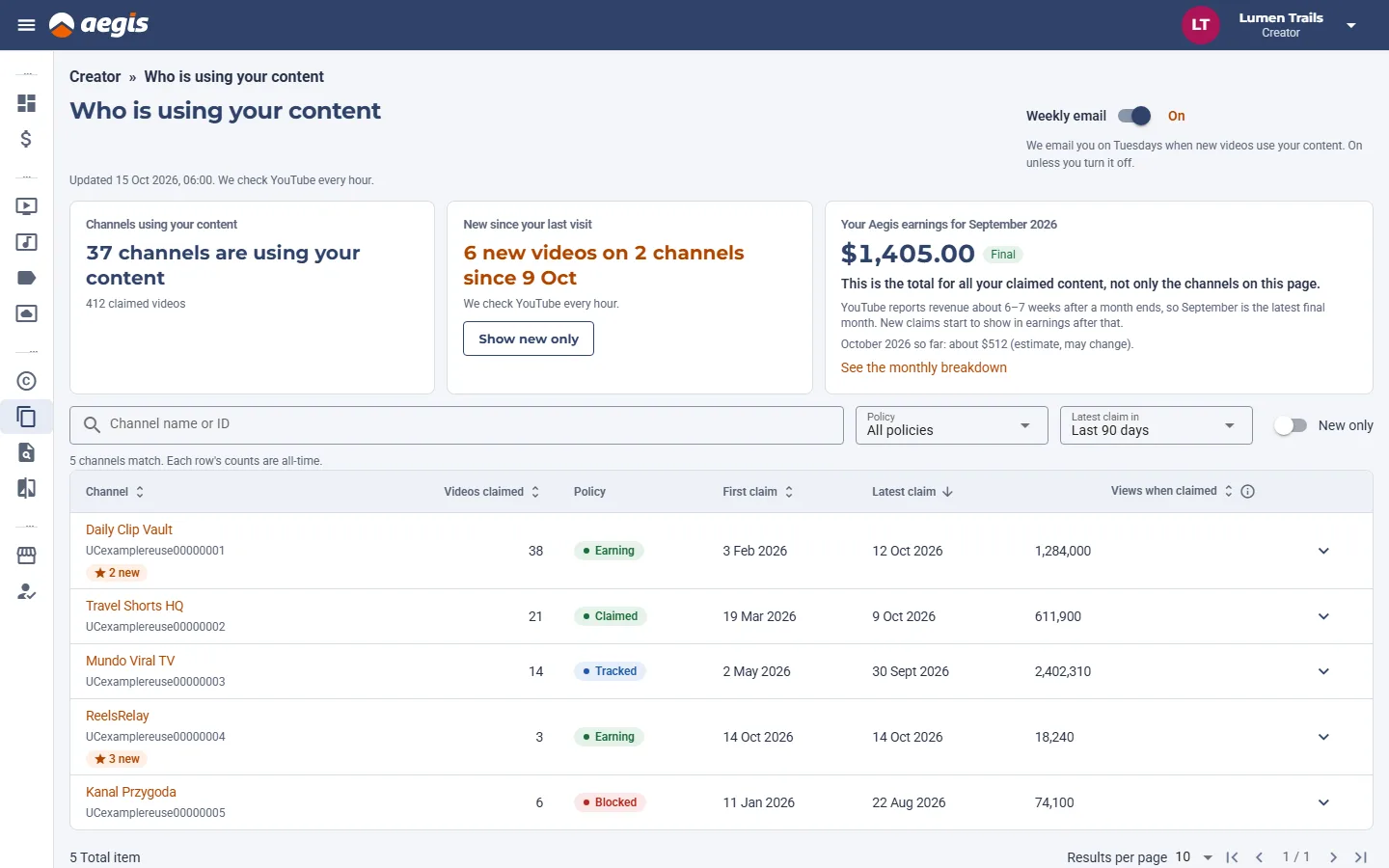
Below the summaries is one row per channel: how many of its videos are claimed, the policy on them, the first and latest claim, and the views the videos had when they were claimed. Open a row to see that channel's latest claimed videos, each with a link to YouTube.
The policy tells you what the claim does:
- Earning. The video stays up and earns ad revenue for you.
- Tracked. The claim only follows the video's views.
- Blocked. The video can't be watched.
- Claimed. Another Aegis policy applies. Other means a policy we don't group.
You can search by channel name or ID, filter by policy, and limit the list to channels whose latest claim was in the last 30 days, 90 days or 12 months. We check YouTube every hour, and the page shows when it last updated.
Turn a reupload into a request
Some of these channels would ask first if there were a place to ask. When you open a channel's row, the page offers your license page. If you have published one, Copy link gives you its address to send them. If you haven't, Set up a license page takes you there. How license pages work explains the rest.
Not sure whether a channel is a fan or a spam account? Our guide to telling if a reuploader is a spam channel lists the signs.
The weekly email
On Tuesdays we email you when new videos on YouTube use your content, with a link to the page. If nothing new was claimed that week, there's no email.
The email is on unless you turn it off. Use the Weekly email switch at the top of the page, or the unsubscribe link in any of the emails. Turning it off changes nothing else: the page stays, and your other Aegis emails stay as they are.
If you're with an agency
Your agency can open the same report for each of its creators. Its view is read-only. Opening it doesn't change what counts as new for you, and it can't turn your email on or off.
What it doesn't do
The page lists channels with an active Aegis claim on their videos. Channels we haven't claimed yet aren't on it, and it doesn't take videos down. If a reupload of yours isn't claimed, use Manual Claims in the app or tell us through the contact form.
Open Who is using your content to see your channels.