'%3e%3cpath%20class='a'%20d='M662.846,1043.8l-14.75-10.817-14.912,10.936a15.981,15.981,0,1,1,29.662-.119Z'%20transform='translate(-632.011%20-1022.02)'/%3e%3cpath%20class='b'%20d='M704.176,1354.583l13.291,9.865a16.179,16.179,0,0,1-26.706.112Z'%20transform='translate(-688.094%20-1339.553)'/%3e%3c/g%3e%3cg%20transform='translate(40.433)'%3e%3cpath%20class='a'%20d='M21.61-179.726a26.985,26.985,0,0,0-8.211-1.5c-7.4,0-11.8,4.757-11.8,12.382,0,4.106,2.509,6.256,5.539,6.256a8,8,0,0,0,5.507-2.281l.424,2.053h5.213Zm-7.234,3.519-1.6,7.722a4.593,4.593,0,0,1-2.411.782c-1.173,0-2.02-.749-2.02-2.444,0-3.389,1.6-6.191,4.79-6.191A8.418,8.418,0,0,1,14.377-176.207ZM38-168.583a14.118,14.118,0,0,1-5.7,1.238c-2.216,0-3.519-.88-3.519-2.444a4.5,4.5,0,0,1,.1-.815,15,15,0,0,0,3.975.554c3.812,0,7.266-1.629,7.266-6.028,0-2.7-2.151-5.148-6.745-5.148-7.331,0-11.469,5.735-11.469,11.8,0,5.507,3.877,7.038,8.635,7.038a25.253,25.253,0,0,0,6.908-1.043ZM29.267-173.7a3.587,3.587,0,0,1,3.324-3.226c1.173,0,1.6.587,1.6,1.238,0,1.271-.945,2.085-3.291,2.085C30.473-173.6,29.886-173.633,29.267-173.7Zm31.248-6.028a27.108,27.108,0,0,0-8.113-1.5c-7.592,0-11.991,4.953-11.991,12.414,0,4.334,2.607,6.223,5.572,6.223a8.258,8.258,0,0,0,5.6-2.281l-.1.815c-.326,2.737-2.542,3.486-4.985,3.486a22.6,22.6,0,0,1-6-1.01l-.978,4.985a31.974,31.974,0,0,0,6.843.847c5.441,0,9.775-1.792,10.948-7.69Zm-7.234,3.552-1.531,7.69a5.239,5.239,0,0,1-2.574.782c-1.173,0-2.02-.782-2.02-2.379,0-3.454,1.4-6.223,4.725-6.223A7.013,7.013,0,0,1,53.281-176.175Zm10.362-4.659-2.476,12.349c-.717,3.617.652,5.865,4.464,5.865a25.851,25.851,0,0,0,3.747-.293l.782-4.334c-2.281.033-2.542-.912-2.216-2.574l2.281-11.013Zm7.82,13.1-1.075,4.822a39.953,39.953,0,0,0,6.289.489c5.7,0,9.775-2.313,9.775-7.331,0-5.474-7.4-3.877-7.4-5.637,0-.652.619-1.14,2.607-1.14a23.311,23.311,0,0,1,4.79.554l1.108-4.659a29.486,29.486,0,0,0-5.735-.586c-4.985,0-9.58,2.118-9.58,7.136,0,5.311,7.4,3.78,7.4,5.409,0,1.108-1.173,1.5-2.867,1.5A29.214,29.214,0,0,1,71.463-167.735Z'%20transform='translate(-1.604%20187.383)'/%3e%3cpath%20class='b'%20d='M614.561-237.057h6.712l.945-4.79h-6.712Z'%20transform='translate(-552.294%20241.847)'/%3e%3c/g%3e%3c/svg%3e)
If your videos do well, someone is probably reuploading them. Some of those channels are spam. Others are fans, compilation channels and reaction channels who would ask first if there were somewhere to ask.
A license page gives them that place. You publish a public page with your terms, they request a license, and when you approve, your Content ID claim stays on their upload and the revenue is shared. A reupload you would have blocked now earns for both of you.
This 81-second demo shows the whole flow: setting up your page, a fan's request and your approval.
What a license page is
A license page is a public page about you and your videos, at an address like aegis-app.h.ki/license/yourhandle. You set it up yourself, and it shows:
- a short intro you write;
- up to six of your videos that you choose to feature;
- your terms: the share of revenue a licensee gets, and how many months a license lasts;
- answers to the questions you expect, and a request button with a label you choose, in your accent color.
Anyone can open the page. People who want to reuse your videos request a license from it.
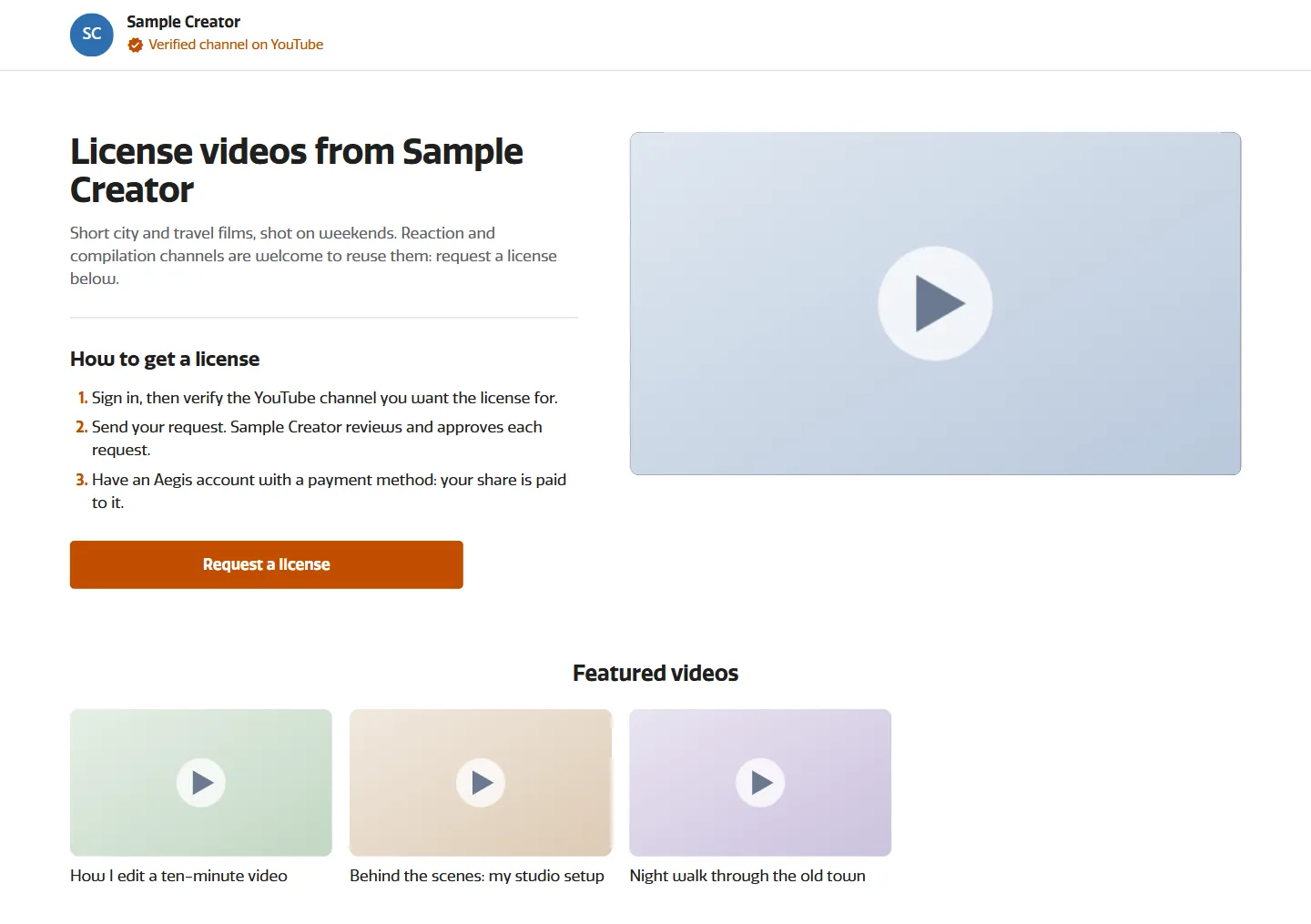
See an example page live on Aegis.
How to turn it on
You can set up a license page if you're an accepted Aegis creator with a verified YouTube channel.
- Sign in to Aegis and open License page (aegis-app.h.ki/creator/license-page).
- Pick your address. Your handle becomes the end of
aegis-app.h.ki/license/yourhandle, so keep it close to your channel name. - Write a short intro: who you are and what kind of reuse you welcome.
- Choose up to six videos to feature.
- Set your terms: the licensee's share, from 1% to 100%, and the length of a license, from 1 to 12 months.
- Pick an accent color, add your FAQs and choose the label for the request button.
- Publish. Your first publish is reviewed by Aegis, or by your agency if you're under one. Once it's approved, the page is live.
Then share the link where reuploaders will see it: your YouTube video descriptions, your channel's About section and your socials.
How requests work
- Someone finds your page. A fan, a compilation channel or a reaction channel opens it and asks for a license.
- They set up their side. A requester needs an Aegis account, which they create in one click on your page. They also need a payment method, and they verify their YouTube channel so you know whose channel the license is for.
- You decide. Open License requests in Aegis and approve or reject each request.
- You choose the coverage. When you approve, the license can cover all your videos, or only the videos you select.
- The upload stays claimed. Your Content ID claim stays on the licensee's upload, and its revenue is shared for the length of the license.
When you approve, two changes are allowed: you can raise the licensee's share above what they requested, and you can shorten the length. You can't lower their share or make the license longer than they asked.
A license runs from the month you approve it. If you change your mind, you can revoke it, and it ends from the next month.
How the money works
A licensed upload works like any other claimed video, except that part of the revenue goes to the licensee.
- Your claim stays. The licensee's upload is still claimed for you.
- The licensee's share comes out of your share of what those claims earn. You set that share on your page.
- Your agency's share doesn't change. If you're under an agency, its share stays as it is.
- Licensees are paid through their own Aegis account, using the payment method they set up.
Without a license, the usual move is to block the copy, and a blocked copy earns nothing. With a license, a channel that wants to use your video has a reason to do it properly, and you earn from the reuse.
If you're under an agency
Your agency can do all of this for you. It can set up and publish your page, review your first publish, approve or reject requests, choose the coverage and revoke licenses. If you'd rather not manage it yourself, ask your agency to turn it on.
FAQs
Do I lose my claim?
No. Your Content ID claim stays on the licensee's upload, so it keeps earning for you.
Who can request a license?
Anyone with an Aegis account, a payment method and a verified YouTube channel. The account takes one click to create on your page. Nobody gets a license until you, or your agency, approve the request.
Does a license cover all my videos?
You decide when you approve. A license can cover all your videos, or only the videos you select.
Can I change the terms when I approve?
Partly. You can raise the licensee's share or shorten the length from what they requested, but you can't lower the share or make the license longer.
What does it cost?
The share you give. A licensee's share comes out of your share of what their upload earns, and you set it yourself.
How long does a license last?
Between 1 and 12 months, as you set in your terms. It starts in the month you approve it. If you revoke it, it ends from the next month.
Can my agency manage it?
Yes. Your agency can do everything on this page for you, and its own share doesn't change.
What about channels that never ask?
A license page adds a way in for the channels that would rather do it properly. It doesn't change how other reuploads are handled. If you're not sure what kind of channel is copying you, our guide to telling if a reuploader is a spam channel can help.
Set up your page
If people are going to reuse your videos, a license page lets you set the terms. Open aegis-app.h.ki/creator/license-page and publish yours.